n8n OAuth2 'status: error, message: unauthorized' with Google Calendar [Solved]
Discover how to fix the n8n OAuth2 'status error, message unauthorized' error with Google Calendar by understanding the root cause and implementing the correct solution for internal domain deployments.
Introduction
After my N8N Docker container silently upgraded to version 2.1.4, I started receiving persistent OAuth2 authentication failures when connecting to Google Calendar. The error message "status: error, message: unauthorized" appeared consistently, despite the workflow having worked perfectly for months.
What made this particularly frustrating was that my setup differs from most N8N deployments, making solution finding by Google search not so effective - I run N8N on an internal domain and proxy external requests through an existing website domain. This architecture is more secure than just exposing the service to the internet, but unfortunately, it creates specific challenges with OAuth2 callbacks, as I found out.
My Homelab Setup
My N8N deployment uses:
-
Internal domain:
n8n.local.lab(accessible only on my internal network) -
External proxy: Requests from the internet go through
mypublicdomain.comvia Traefik on my swarm cluster. (webhooks and callbacks) - No public exposure: I don’t expose the n8n editor directly to the internet.
This setup works for most N8N use cases, but it causes issues with OAuth2 because:
- N8N assumes the domain you log in from is the same domain that receives OAuth2 callbacks
- Google OAuth2 requires
authorizedredirect URIs - Internal domains with self-signed certificates cause browser security issues during OAuth2 redirects
The Problem
When attempting to authenticate with Google Calendar using the OAuth2 credential, the popup would open correctly, but would contain the following message in json:
1

"status: error, message: unauthorized"
This stopped the token renewal and made my Google Calendar node unusable.
Troubleshooting Attempts
I systematically tried numerous approaches from the docs and various Google and perplexity.ai searches:
OAuth2 Credential Configuration
- Recreated the N8N Google Calendar credential
- Generated new OAuth client ID and secret
- Verified redirect URI matched exactly between Google Cloud Console and N8N
Google Cloud Console Settings
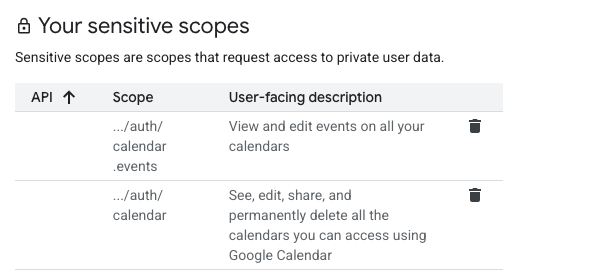
- Changed OAuth app from “Testing” to “Production” mode
- Deleted and recreated the app
- Added required scopes (which had disappeared for some reason):
https://www.googleapis.com/auth/calendar
Version Testing
- Rolled back to version 2.0.1
- Tried version 2.1.2
- Tested current version 2.1.4
- (in hindsight, I should have rolled back <2.0)

Debugging
- Enabled debug logging (no useful information)
- Checked Traefik logs (nothing of interest there either)
- Tested callback URLs directly with wget
- Verified network connectivity from within the container
Browser and Environment
- Tested in incognito mode
- Cleared cookies and cache
- Tried different browsers
- Checked for URL trailing slash issues
Reverse Proxy Configuration
- Verified X-Forwarded headers
- Modified Traefik middleware multiple times (didn’t seem to make any difference)
- Tested different N8N_HOST values and other Environment variable changes
Workarounds (once I understood the root cause)
- URL Shortener: Tried redirectmeto.com - Google rejected it (as it classes this as a shortener and URL shorteners are not allowed)
- Internal Subdomain: Created a public subdomain pointing to internal IP - this broke my external webhooks and caused certificate issues
The Discovery
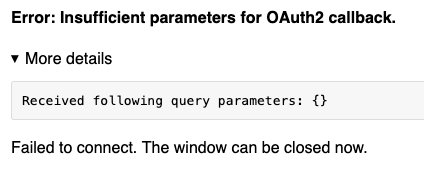
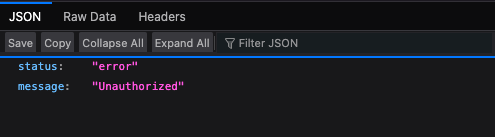
During testing, I noticed an important difference:
- Internal callback:
https://n8n.local.lab/rest/oauth2-credential/callbackreturned HTML about missing parameters - External callback:
https://mypublicdomain.com/rest/oauth2-credential/callbackreturned the JSON error
This suggested that N8N was treating requests differently from the endpoint I was browsing from, and further exploration revealed that it was looking for a ‘logged in session’ on the callback URI.
Of course this was not happening as I’m only logging in from my internal address, not the external address that the callback is required for.
Root Cause
Before N8N version 2.0 this was working fine, but:
Starting with N8N v2.0, the default behaviour changed:
-
Before v2.0:
N8N_SKIP_AUTH_ON_OAUTH_CALLBACK=true(default) -
From v2.0:
N8N_SKIP_AUTH_ON_OAUTH_CALLBACK=false(default)
The authentication middleware now runs before OAuth2 callback handling. When I logged in to the internal domain but OAuth2 callbacks arrived externally, the authentication check failed because:
- Authentication cookies were tied to
n8n.local.lab - External callbacks arrived without valid authentication
- The middleware returned
{"status": "error", "message": "Unauthorized"}before reaching OAuth2 logic
The Solution
The fix should have been simple - set the environment variable: (and this is what it says in the documentation)
1

N8N_SKIP_AUTH_ON_OAUTH_CALLBACK=true
However, this didn’t work. After extensive analysis, I discovered that the Docker container build had a discrepancy - it was still performing some of the user authentication checks on callbacks even when the flag was set. Specifically, it was expecting the user ID to be defined, which, since there is no authentication, was not available.
How to fix this? I’m hoping this is just a packaging error made when the official Docker container was built. (the wrong OAuth2 code ends up in the container, as I see good code without this bug in the repo)
For now I’ll take a quick fix approach and hope that the next version has this fixed… If not, then it is time to raise a ticket!
Docker Container Patch
Since the official Docker image didn’t properly respect the N8N_SKIP_AUTH_ON_OAUTH_CALLBACK=true flag, I created a custom Docker image with a patched version of the OAuth2 service. Here’s how to replicate this fix:
1. Create a custom Dockerfile
1
2
3
4
5
6
7

FROM docker.n8n.io/n8nio/n8n:2.1.4

# Copy the 'fixed' code into place
COPY oauth.service.js /usr/local/lib/node_modules/n8n/dist/oauth/oauth.service.js

# Use the existing entrypoint
ENTRYPOINT ["/docker-entrypoint.sh"]
2. Create a patched oauth.service.js
The key change is in the decodeCsrfState method around line 150. The original code throws an AuthError when the user ID doesn’t match, but we need to skip this check when N8N_SKIP_AUTH_ON_OAUTH_CALLBACK=true:
But for now I’ll just comment out the throw and do something more elegant if I put in a PR.
1
2
3
4
5

if (decryptedState.userId !== req.user?.id) {
    this.logger.debug('throwing since req.user?.id is wrong:', req.user?.id);
    // SDR: this should not trigger when N8N_SKIP_AUTH_ON_OAUTH_CALLBACK=true
    // throw new auth_error_1.AuthError('Unauthorized');
}
The commented-out line is the original code that was causing the issue. By commenting it out, the user id check no longer causes an exception.
The logger messages is visible in the docker logs if you turn on debug logging.
With this patched version, the OAuth2 callback will work correctly even when authentication cookies are absent.
Key Lessons
- Check release notes for breaking changes before upgrading
-
Avoid
:latesttags in production - pin to specific versions to avoid silent upgrades on restart - Carefully consider authentication flows when using reverse proxies
- N8N assumes same-domain authentication - callbacks should come from the same domain you log in from so all these issues would not have been there if I had done a standard standalone installation
- Source code analysis is invaluable when documentation is lacking and debug messages are few and far between. (Thanks DeepWiki!)
Architectural Implications
This issue reveals that N8N’s architecture assumes:
- You log in and use OAuth2 from the same domain
- Authentication state is maintained across the OAuth2 flow
For internal-only deployments, this creates challenges:
- Google won’t allow internal domains in redirect URIs
- Self-signed certificates cause browser security issues
- URL shorteners are prohibited so it’s hard to hack around this
- Changing
WEBHOOK_URLbreaks external integrations
The N8N_SKIP_AUTH_ON_OAUTH_CALLBACK=true setting doesn’t work correctly, at least from the current 2.1.4 official Docker image.
References
- n8n Google OAuth2 Documentation
- n8n Release Notes
- Google OAuth 2.0 Documentation
- DeepWiki - Source Code Search
Final Thoughts
This experience highlights the importance of:
Explicit Breaking Changes
The n8n team made a sensible security improvement, but the change could have been better communicated. Requiring users to explicitly acknowledge breaking changes (e.g., by refusing to start without the new variable set) would reduce silent failures.
Source Code Analysis
When traditional troubleshooting fails, direct source code analysis becomes essential. Tools like DeepWiki provide immediate access to implementation details that can uncover issues not documented elsewhere. (my favourite go-to at the moment)
For others facing similar issues with internal n8n deployments, the N8N_SKIP_AUTH_ON_OAUTH_CALLBACK=true environment variable is the key, though you may need to jump through some hoops like I did if you are logging in from a domain different from the callback domain and you are using the current 2.1.4 official Docker container.
Have You Found a Better Solution?
If you’ve encountered this issue and found a different approach that works better, I’d love to hear about it!
Please share your experiences in the comments below. Alternate solutions, workarounds, or even just confirmation that you’re facing the same challenges would be greatly appreciated.